The Documentation Problem in Salesforce Projects
Every Salesforce architect knows the pattern. You spend weeks running discovery workshops, gathering requirements across Sales Cloud, Service Cloud, and Marketing Cloud workstreams. You fill whiteboards with process flows, scribble field mappings on napkins, and record hours of stakeholder interviews. And then the real work begins: translating all of that raw input into the half-dozen document types that every enterprise implementation demands.
On a recent enterprise Salesforce implementation, our team catalogued the documentation overhead. A single requirement for a custom Lead qualification process generated the need for a technical specification, three user stories with acceptance criteria, a process flow diagram, data dictionary entries for fourteen fields, a test plan with positive and negative scenarios, and an admin guide section explaining configuration steps. Multiply that across 120 requirements and you are looking at thousands of pages of documentation, most of it written by architects and senior consultants billing at premium rates.
The cost was staggering, but the bigger problem was consistency. When six different consultants write user stories, you get six different formats. When technical specs are authored across time zones, field naming conventions drift. Review cycles balloon because reviewers spend more time correcting formatting than validating logic. I started wondering whether the emerging generation of AI coding tools could fundamentally change this equation.
Vision: Requirements In, Documentation Out
The idea was straightforward: build a tool where a Salesforce architect pastes or uploads a set of business requirements, selects the documentation types they need, and receives draft-quality documents within minutes. Not rough outlines, but structured, internally consistent documents that follow the team's templates and naming conventions. The architect would still review and refine, but the heavy lifting of first-draft generation would be automated.
I chose Claude Code as the AI backbone for several reasons. First, Anthropic's Claude models handle long-context inputs exceptionally well, which matters when you are feeding in a 40-page requirements document. Second, Claude's instruction-following capabilities are precise enough to produce documents that adhere to strict formatting rules, a non-negotiable when your deliverables go to enterprise clients. Third, the Claude API offers the flexibility to build prompt chains where the output of one generation step feeds into the next, enabling multi-document consistency.
The goal was never to remove the architect from the process. It was to shift their time from formatting and first-draft writing to validation, refinement, and strategic decisions. An architect reviewing an AI-generated spec catches gaps faster than one staring at a blank page.
The toolkit needed to support six document types: Technical Specifications, User Stories with Acceptance Criteria, Process Maps (outputting structured data that a diagramming tool could render), Data Dictionaries, Test Plans, and Admin Guides. Each type has its own structure, its own audience, and its own level of technical detail. That meant each type would need its own carefully engineered prompt template.
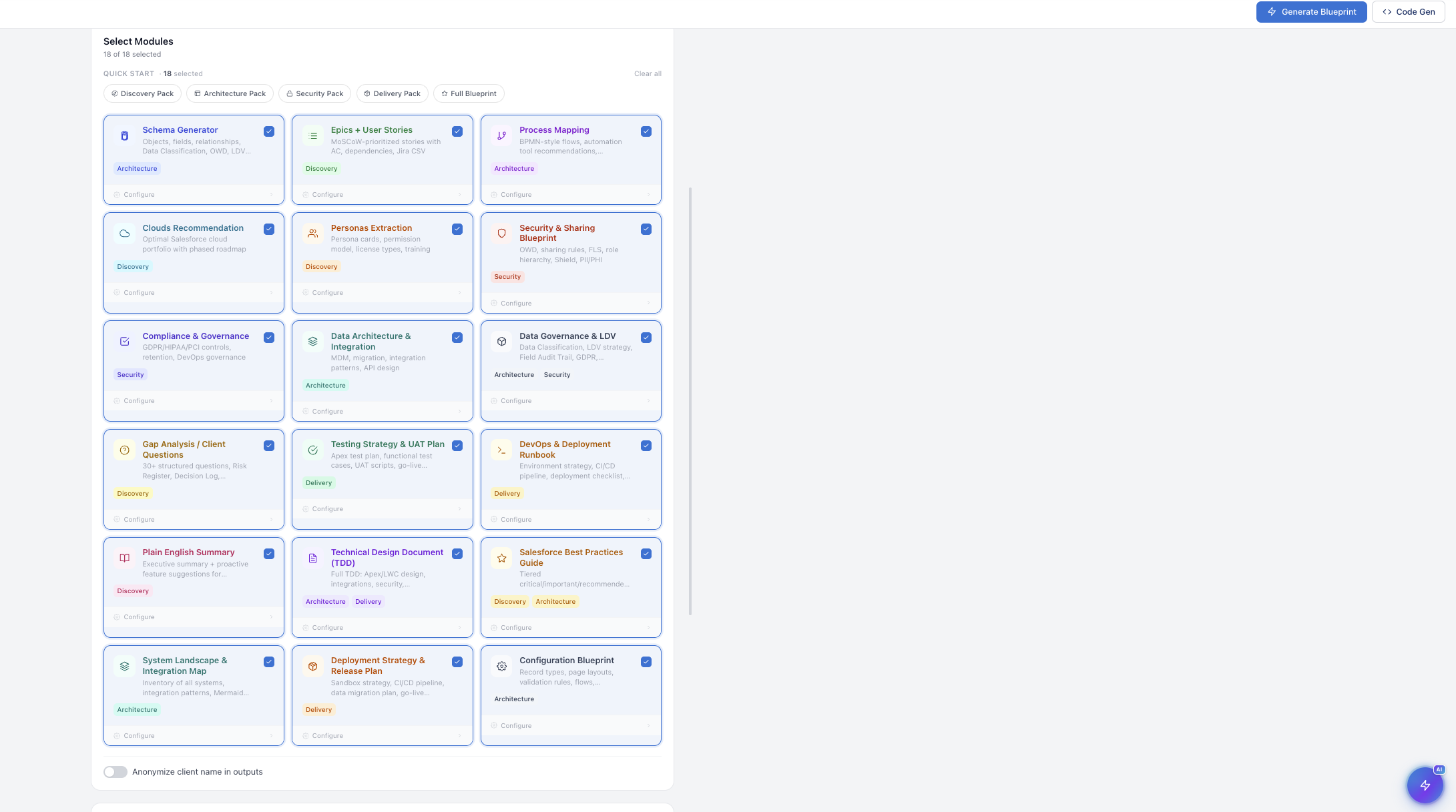
Architecture: How the Toolkit Works
The system is built as a Python application with a lightweight web interface. The architecture follows a pipeline pattern with four stages: ingestion, parsing, generation, and assembly. During ingestion, the user uploads or pastes requirements in any format, whether that is a Word document, a Confluence export, a spreadsheet, or plain text. The parsing layer normalizes this input into a structured JSON representation, extracting individual requirements, identifying Salesforce objects and fields mentioned, and tagging each requirement with a functional area.
The generation layer is where Claude does the heavy work. Each document type has a dedicated prompt template that receives the parsed requirements along with project-specific context such as naming conventions, org-specific custom objects, and the client's preferred documentation style. The prompts are chained so that the technical specification is generated first, and its output is fed as context into the user story and test plan generators. This chaining is critical because it ensures that field names referenced in user stories match the exact API names defined in the technical spec.
The assembly layer takes the raw Claude outputs and formats them into final deliverables. For text-based documents, this means applying Markdown or HTML templates. For data dictionaries, it outputs structured CSV or spreadsheet-ready formats. For process maps, it generates Mermaid diagram syntax that can be rendered in tools like Lucidchart or draw.io. The entire pipeline runs asynchronously, generating all six document types in parallel once the technical specification baseline is established.
On the infrastructure side, the application runs on a simple Flask server. Requirements are stored in a local SQLite database during processing, and completed documents are cached so that regeneration of a single document type does not require re-processing the entire requirement set. The Claude API calls use the Messages API with streaming enabled, so the user can see documents being generated in real time through the web interface.
Prompt Engineering for Different Document Types
The prompt engineering was the most demanding part of the build. Generic prompts produce generic documents. To get output that reads like it was written by a senior Salesforce consultant, each prompt template needed deep domain specificity. I spent considerable time studying the best documentation I had produced over the years, identifying what made a technical spec useful versus decorative, and encoding those patterns into prompt instructions.
The technical specification prompt, for example, instructs Claude to organize content by Salesforce object, to specify field-level details including API name, data type, length, default value, and validation rules, and to explicitly call out integration touchpoints. The user story prompt follows a strict Given-When-Then format with testable acceptance criteria and includes instructions to tag each story with a Salesforce feature area such as Flow, Apex Trigger, or Validation Rule.
TECH_SPEC_PROMPT = """
You are a senior Salesforce Solution Architect writing a technical
specification document. Given the following business requirements,
produce a detailed technical spec organized by Salesforce object.

PROJECT CONTEXT:
- Org type: {org_type}
- Naming convention: {naming_convention}
- API version: {api_version}

REQUIREMENTS:
{parsed_requirements}

For EACH requirement, document:
1. Object(s) affected (standard or custom)
2. Field definitions: Label, API Name, Type, Length,
   Required, Default Value, Help Text
3. Validation rules with error condition and message
4. Automation: specify whether Flow, Apex Trigger,
   or Process Builder, with trigger conditions
5. Record types and page layout assignments
6. Integration points: endpoint, method, auth, payload
7. Security: FLS, sharing rules, permission sets

Use exact Salesforce API naming conventions.
Format as structured Markdown with tables for field definitions.
Flag any requirement that is ambiguous with [NEEDS CLARIFICATION].
"""
The test plan prompt was particularly interesting to engineer. Good test plans do not just verify that something works; they verify that it fails correctly. The prompt instructs Claude to generate positive scenarios, negative scenarios, boundary conditions, and bulk data scenarios for each requirement. It also asks for prerequisite data setup steps, which is something junior QA engineers frequently overlook and which causes test execution delays on real projects.
USER_STORY_PROMPT = """
You are a Salesforce Business Analyst converting technical
requirements into user stories with acceptance criteria.

TECHNICAL SPEC CONTEXT (use exact field names from this spec):
{technical_spec_output}

REQUIREMENTS TO CONVERT:
{parsed_requirements}

For each requirement, generate:

**User Story:**
As a [specific Salesforce user role],
I want to [action tied to a specific Salesforce feature],
So that [measurable business outcome].

**Acceptance Criteria (Given-When-Then):**
- Given: [precondition including record type, profile]
- When: [user action or system trigger]
- Then: [expected result with specific field/value refs]

**Implementation Tag:** [Flow | Apex | Validation Rule |
  Lightning Component | Config-Only]

**Estimated Complexity:** [Low | Medium | High]

Generate 1-3 user stories per requirement depending on
complexity. Each acceptance criterion must be independently
testable. Reference exact API field names from the technical
spec context above.
"""
One lesson learned early was the importance of feeding the technical spec output into downstream prompts. Without that chaining, Claude might name a field "Lead_Score__c" in the technical spec but reference it as "LeadScore__c" in the user stories. By passing the spec as context, all downstream documents inherit consistent naming, which dramatically reduced review time.
Generating Technical Specifications
The technical specification is the cornerstone document, and it is generated first because everything else depends on it. When Claude processes a requirement like "the system should automatically assign leads to the appropriate sales team based on territory and product interest," it produces a structured spec that breaks this down into object modifications, field additions, assignment rule logic, and automation design.
The output includes a field definition table for any new or modified fields, complete with API names following the project's naming convention, data types, picklist values where applicable, and field-level security recommendations by profile. It specifies whether the automation should be implemented as a Flow or Apex trigger, with decision logic written out in pseudocode. For this lead assignment example, Claude would generate the territory matching logic, fallback assignment rules, and round-robin distribution specifications.
What impressed me most was Claude's ability to identify implicit requirements. When the requirement mentions territory-based assignment, Claude proactively includes specifications for a Territory__c custom object if one does not exist, a junction object for many-to-many relationships between territories and users, and a scheduled batch process to rebalance assignments. These are the types of design decisions that a senior architect would make instinctively but that often get missed in first-pass documentation.
The specifications are not perfect on the first pass. Roughly 15-20% of the generated content needs architect review and adjustment, particularly around complex integration patterns and org-specific customizations. But that is a fundamentally different starting point than a blank document. The architect's role shifts from author to editor, and that shift saves substantial time per specification section.
User Stories and Acceptance Criteria
User stories are deceptively difficult to write well. A weak user story says "As a user, I want to see my leads, so that I can work them." A strong user story specifies the role, ties the action to a concrete Salesforce feature, and links the outcome to a measurable business result. The toolkit's user story generator consistently produces the latter because the prompt template enforces that level of specificity.
For each business requirement, the generator typically produces between one and three user stories depending on complexity. A requirement involving a multi-step approval process might yield separate stories for the submission flow, the approval logic, and the rejection handling. Each story comes with three to five acceptance criteria written in Given-When-Then format, with specific field references drawn from the technical spec that was generated in the previous pipeline stage.
The acceptance criteria are where the chained architecture really pays off. Because the user story generator has access to the complete technical specification, it can write criteria like "Given a Lead record where Territory__c equals 'West Coast' and Product_Interest__c includes 'Enterprise Platform,' When the Lead is created via web-to-lead, Then the OwnerId should be set to the next user in the West Coast Enterprise round-robin queue within 5 minutes." That level of specificity makes the stories immediately testable, which is exactly what a QA team needs.
The toolkit generates user stories that are ready for sprint planning, not just backlog filler. By enforcing Given-When-Then acceptance criteria and pulling exact field names from the technical spec, each story arrives with enough detail that a developer can estimate and build against it without a follow-up conversation.
Process Mapping and Data Dictionaries
Process maps presented a unique challenge because the output is not prose but structured diagram data. Rather than trying to generate images directly, the toolkit produces Mermaid diagram syntax, a text-based diagramming language that tools like Lucidchart, draw.io, and GitHub can render natively. For each business process identified in the requirements, Claude generates a flowchart with decision nodes, system actions, user actions, and integration callouts clearly differentiated.
A lead qualification process, for example, gets rendered as a flow starting with the web-to-lead capture, moving through enrichment steps, hitting decision points for scoring thresholds, branching into auto-assignment versus manual review paths, and terminating at either conversion or nurture campaign enrollment. Each node in the diagram includes the specific Salesforce automation that powers it, whether that is a Record-Triggered Flow, a Platform Event, or an Apex invocable action. The architect can paste this Mermaid syntax into their diagramming tool of choice and have a presentation-ready process map in seconds.
The data dictionary generator takes a different approach. It scans the technical specification output and extracts every object and field reference, then produces a comprehensive spreadsheet-format dictionary. Each entry includes the object name, field label, API name, data type, length, required status, default value, description, and the requirement ID that originated it. That last column, the traceability link back to the source requirement, is something that architects frequently skip when building data dictionaries manually but that auditors and compliance teams always ask for.
For organizations with existing metadata, the toolkit can accept a Salesforce field export as additional context. Claude then generates the data dictionary as a delta view, highlighting which fields are new, which are modifications to existing fields, and which existing fields are referenced but unchanged. This delta format proved extremely valuable during design review meetings because stakeholders could immediately see the scope of schema changes without wading through hundreds of existing field definitions.
Test Plans and Admin Guides
The test plan generator was the document type that received the most positive feedback from project teams. Writing thorough test plans is tedious work, and even experienced QA analysts tend to focus on happy-path scenarios at the expense of edge cases. The toolkit's prompt template explicitly requires four categories of test scenarios for each requirement: positive tests confirming expected behavior, negative tests verifying proper error handling, boundary tests for field limits and picklist constraints, and bulk tests validating that the solution works at scale with data loader volumes.
Each test scenario includes prerequisite data setup instructions, step-by-step execution instructions written for someone unfamiliar with the org, expected results with specific field values, and cleanup steps. The bulk test scenarios are particularly useful because they specify exact record counts, typically 200 and 10,000 records to test against governor limits and batch processing boundaries. These are the scenarios that catch production defects, and they are the ones most likely to be skipped when test plans are written under deadline pressure.
Admin guides target a completely different audience. While technical specs are written for developers and architects, admin guides are written for the Salesforce administrator who will maintain the configuration after the implementation team rolls off. The prompt template instructs Claude to write at a level that assumes familiarity with Salesforce Setup but not with the specific business logic behind each automation. Each guide section includes screenshots placeholders (marked for the team to capture during UAT), navigation paths using the exact Setup menu structure, configuration values with explanations of why each value was chosen, and troubleshooting steps for common issues.
The admin guide generator also produces a dependencies section that maps each configuration element to its upstream and downstream connections. If someone modifies the Lead scoring Flow, the admin guide tells them which assignment rules, escalation paths, and reports will be affected. This dependency mapping alone has prevented several post-go-live incidents on projects where the toolkit was used.
AI-Powered Salesforce Q&A
Beyond document generation, we added an AI feature that lets users ask questions about any Salesforce topic directly within the toolkit. The knowledge base module accepts uploaded documents — PDFs, requirement specs, org metadata exports — and indexes them for conversational retrieval. When a user types a question like "What are the sharing rule implications for the Territory__c object?" or "How does the lead scoring flow handle null values?", the system pulls relevant context from both the uploaded project documents and trusted Salesforce sources to produce an accurate, project-aware answer.
The data is fetched from trusted sources including official Salesforce documentation, Apex developer guides, and the project's own uploaded specifications. This means the answers are grounded in verified reference material rather than general AI knowledge. For implementation teams, this eliminates the cycle of searching through Salesforce Help articles, cross-referencing with Trailhead modules, and then mapping those answers back to the specific project context. The AI does that synthesis in seconds, citing the sources it drew from so the architect can verify the reasoning.
This feature proved particularly valuable during design review sessions. Instead of pausing a meeting to look up governor limit thresholds or checking whether a particular field type supports encryption, the team could query the toolkit in real time and get answers grounded in both Salesforce platform documentation and the project's own technical specifications. It turned the toolkit from a document generator into a living knowledge companion for the entire implementation lifecycle.
Results and What Changed
After deploying the toolkit across three Salesforce implementation projects, the numbers tell a clear story. Documentation time per requirement dropped from an average of four hours to approximately 45 minutes, with the remaining time spent on architect review, refinement, and screenshot capture. That translates to roughly an 80% reduction in documentation effort, freeing senior consultants to spend more time on design decisions, stakeholder alignment, and technical problem-solving.
Consistency improved dramatically. Before the toolkit, documentation reviews surfaced an average of twelve formatting and naming inconsistencies per document set. After adoption, that number dropped to fewer than two per set, and those were typically edge cases involving ambiguous requirements rather than formatting drift. The cross-document consistency enabled by the chained prompt architecture meant that a field name defined in the technical spec appeared identically in every user story, test plan, and admin guide that referenced it.
Review cycle time compressed as well. When reviewers received documents that were consistently formatted and internally coherent, they could focus on substance rather than style. Design review meetings that previously required two sessions to get through documentation issues now concluded in a single session, with discussions centered on architectural decisions rather than typos and naming mismatches.
Perhaps the most unexpected benefit was onboarding speed. New team members joining mid-project could read the generated documentation set and get up to speed on requirements, technical design, and testing expectations within a day instead of the usual week. The consistency of format and the depth of detail made self-service onboarding viable for the first time on complex Salesforce programs.
The toolkit is not a replacement for skilled Salesforce architects and analysts. It is an amplifier. It handles the mechanical work of translating requirements into structured documentation so that human experts can focus on the judgment calls, the design trade-offs, and the stakeholder conversations that actually determine whether a Salesforce implementation succeeds. If you are running Salesforce projects and spending more than a quarter of your team's time on documentation, I would strongly encourage you to explore what AI-powered generation can do for your delivery process. The technology is mature enough today to deliver production-quality results, and the time savings compound quickly across a multi-cloud implementation.